Where to Get Your Blinko Sticker Printed (and What to Tell Them)
Where to get your Blinko QR code loyalty sticker printed — local print shops, online services, exact specs to request, estimated cost, and a ready-to-send email template.
Blinko Team
Blinko Local
You have downloaded your Blinko sticker design from the portal. Now you need to get it printed. This guide covers where to find a print shop near you, what to ask for, and how to communicate your requirements so you get exactly what you need — the first time.
If you have not downloaded your sticker file yet, start here first: How to Download Your Blinko QR Sticker Design
What you are looking for
You need a vinyl sticker — not paper, not a regular label. Vinyl is:
- Waterproof — survives spills, condensation, and regular cleaning
- UV-resistant — will not fade in a window or under bright lighting
- Durable — stays on doors, walls, and glass for years
- Removable — most vinyl stickers come off cleanly without damaging surfaces
Your Blinko sticker file is print-ready at 300 DPI. No resizing or reformatting needed — just send the file and give the shop the specs listed below.
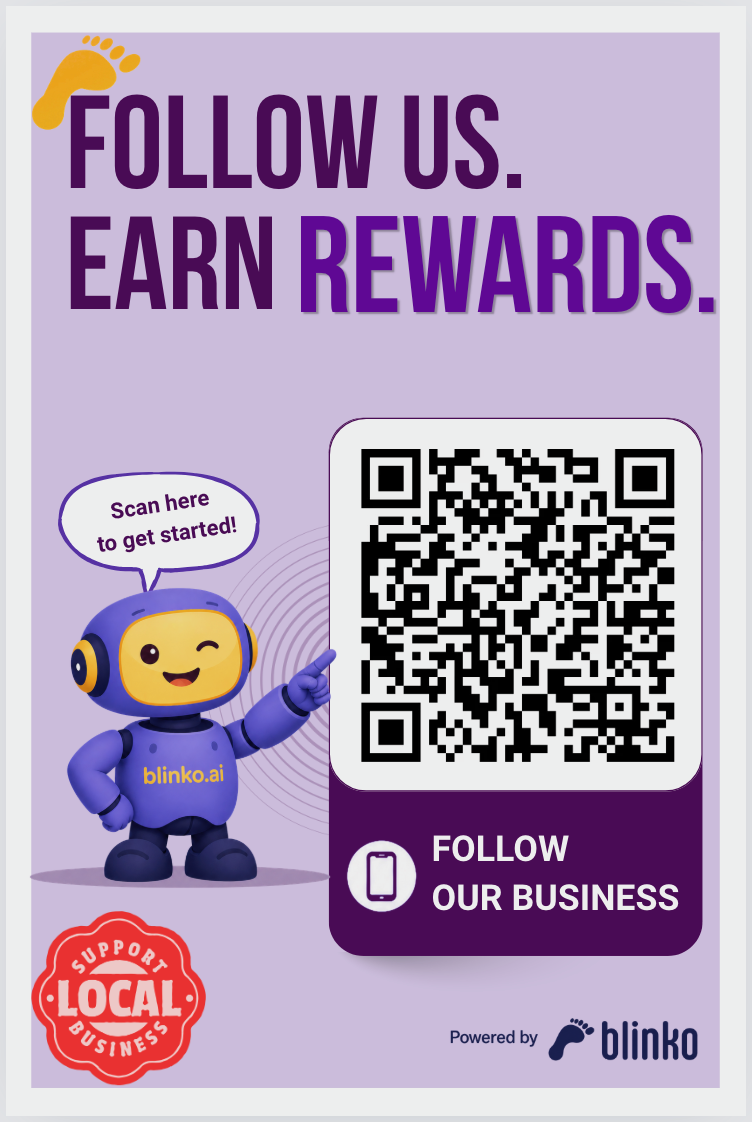
The 6×9 sticker is ideal for entrance doors and windows
4 types of print shops — and how to find each one
1. Local Sign & Graphics Shops ⭐ Best option
These are specialist shops — FastSigns, SpeedPro, and independent sign studios. They work with vinyl every day and will give you the best result at a fair price.
How to find one near you:
- Google: Search
vinyl sticker printing near meorsign shop near me. Look for shops with 4+ star ratings and reviews that mention vinyl, decals, or window graphics. - Google Maps: Zoom into your area and search
sign shop. Switch to Map view to find the closest options. Check photos — shops that show window graphics or vehicle decals in their photo gallery are a great fit. - Yelp: Search
sign shoporvinyl printingin your city. Filter by "Open Now" for walk-in visits. Read recent reviews for turnaround time and print quality comments. - Nextdoor: Post in your neighborhood or business group asking for a recommendation. Local business owners in your area are likely to have used one recently.
Why they are the best choice:
- They stock premium outdoor vinyl as standard
- Staff understand DPI, bleed, and laminate options — no need to over-explain
- Turnaround is typically 1–2 business days
- Ordering 5+ stickers at once usually comes with a significant per-unit discount
Typical cost: $8–$18 per sticker
2. Commercial Print Shops
Shops like Minuteman Press, AlphaGraphics, and independent print houses handle sticker jobs alongside business cards, banners, and flyers. They have the equipment and the know-how.
How to find one near you:
- Google: Search
commercial print shop near meorcustom printing near me. Look for shops that list "stickers" or "labels" in their services. - Google Maps: Search
print shop. Review photos for storefronts that show large-format printing or display graphics. - Chamber of Commerce directory: Many local chambers list member print shops. Search your city's Chamber of Commerce website for "printing" to find vetted local businesses.
- Local business associations: Groups like your downtown merchants association or local BNI chapter often have print shop members who give discounts to fellow members.
Good for: Businesses that also need other printed materials — menus, flyers, loyalty cards — and want a single vendor relationship.
Typical cost: $10–$20 per sticker
3. Specialty Sticker & Custom Merchandise Shops
Some areas have shops that specialise in custom stickers, decals, and branded merchandise. These often offer the most flexibility for small quantities.
How to find one near you:
- Google: Search
custom sticker shop near meorcustom decals near me. - Etsy (local sellers): Search for
custom vinyl stickerand filter by your city or region. Some Etsy sellers are local and accept walk-ins or same-city shipping. - Instagram: Search
#[yourcity]stickersor#[yourcity]printing— many boutique print shops market through Instagram and are easy to contact via DM. - Facebook Marketplace / local groups: Search your city's small business Facebook groups. Print shops often advertise there and respond quickly to direct inquiries.
Good for: Businesses that want to start small — order 3 to test placement and materials, then scale to 20+ once you find the right setup.
Typical cost: $6–$15 per sticker, often the most competitive for small quantities.
4. General Copy & Print Centers
Chains like FedEx Office, The UPS Store, and Staples Print & Marketing offer sticker printing at most locations. Less specialised than the options above, but widely available and reliable for a first run.
How to find one near you:
- FedEx Office store locator: local.fedex.com/en-us/office — find your nearest location and call ahead to confirm they offer vinyl sticker printing.
- The UPS Store locator: theupsstore.com/tools/find-a-store — search your zip code. Call the specific location to verify vinyl options.
- Staples: stores.staples.com — use the store finder, then call the Print & Marketing Services desk.
- Google: Search
FedEx Office near meorUPS Store printing near mefor quick directions.
Good for: Getting something printed quickly without much planning. Walk-in friendly with same-day service at most locations.
Caveats: Quality and laminate options vary by location. Always ask specifically for vinyl with matte laminate — some locations default to paper-based materials if you do not specify.
Typical cost: $12–$22 per sticker
What to tell your print shop
Give them these exact specs. Use the email template below to make it even easier.
| Spec | What to say |
|---|---|
| File | PNG, 300 DPI, print-ready — no edits needed |
| Material | Premium vinyl (glossy or matte) |
| Finish | Matte laminate — protects against UV and moisture |
| Size | 5×7 inches or 6×9 inches (whichever you downloaded) |
| Quantity | Start with 3–5; order more once you confirm placement |
| Cut | Straight cut with a small white border, or die-cut to rounded rectangle |
| Adhesive | Permanent for glass/painted surfaces; removable if you may need to reposition |
Ready-to-send email template
Click the button below to open a pre-filled email in your mail app. Add the shop's email address in the To field, attach your downloaded sticker PNG, and adjust the size and quantity before sending.
Before you hit Send: add the shop's email address in the To field, attach the PNG file you downloaded from local.blinko.ai, and update the size to match what you downloaded.
Cost summary
| Shop type | Per sticker (est.) | Best for |
|---|---|---|
| Sign & Graphics Shop | $8–$18 | Best quality, fastest turnaround |
| Commercial Print Shop | $10–$20 | Bundle with other print jobs |
| Specialty Sticker Shop | $6–$15 | Small test quantities |
| Copy & Print Center | $12–$22 | Convenience, same-day walk-in |
Ordering 5 stickers at once is usually the sweet spot — enough to cover your counter, entrance door, and a couple of windows, with one spare. Most shops offer meaningful discounts at quantities of 10 and above.
After your stickers arrive
1. Scan the QR code yourself — using the Blinko Spots app
Before placing any sticker, scan the QR code with your own phone. Point your camera at the code and tap the notification that appears.
First time? Your phone will prompt you to download the Blinko Spots app from the App Store or Google Play. Install it — it is free. This is the app your customers use to follow businesses, collect stamps, and redeem rewards.
Once installed, scan again. You will land on your business profile and see exactly what your customers see: your business details, all your active campaigns, and a Follow button that triggers your Welcome Offer on tap. Go ahead and follow your own business — you will earn your first stamp and see the full flow in action.
This single step confirms the QR code works, your campaigns are live, and your customer experience looks the way you intend. It also means you and your staff can answer customer questions from first-hand experience.
For a full walkthrough of the scan experience, see: How to Download Your Blinko Sticker Design — Step 6
2. Clean the surface before applying
Wipe with a dry cloth so the adhesive sticks flat and holds long-term.
3. Place at eye level
Between 4 and 5.5 feet from the floor is the most natural scanning height for most people.
4. Brief your staff
A simple "ask every customer if they have scanned our loyalty code" reminder at the start of each shift drives enrollment faster than any sign placement alone.
Ready to download your sticker design? Start here: How to Download Your Blinko QR Sticker Design →
Ready to turn walk-ins into repeat customers?
Join hundreds of local businesses using Blinko to build lasting loyalty — no apps, no friction.
Get Started Freearrow_forwardReady to turn walk-ins into repeat customers?
Join hundreds of local businesses using Blinko to build lasting loyalty — no apps, no friction.
Get Started Freearrow_forwardDiscover local businesses on Blinko Spots
Browse restaurants, cafes, shops, and more near you — all in one place.
Blinko Team
The Blinko Local team helps small businesses grow with smart loyalty tools and local marketing strategies.